- Physical address is address of the sector with respect to start of physical media.
- One way of addressing was to mentioning plate number , track number and sector number called as CHS address.
- CHS is simple but not used anymore.
- ATA was using 16 bits,4 bits,8 bits for cylinder , Head and Sector respectively. Older BIOS uses 10 bits , 8 bits and 6 bits respectively.
- If ATA is connected with older BIOS, they can work with possible minimum value i.e. 10 bits, 4 bits, 6 bits so only 504 MB disks were compatible with the system.
- To overcome this 504 MB limit , special BIOS were developed to translate addresses from application to hard drive, But it did not support hard disk larger than 8.1 GB
- BIOS were not common, if uses and investigator uses different version of BIOS then no investigation was possible.
LBA (Logical Block Addressing)
- To overcome problems in previous section, LBA was introduced.
- Due to LBA software does not require to know about hard drive geometry.
- For backward compatibility , LBS to CHS formula is there
- LBA=((CYLINDER * Heads_Per_Cylinder) + HEAD) * SECTOR - 1
- Interface Standards
- ATA-1:- Supporting CHS & LBA.
- ATA-3 :- Self Monitoring Analysis and Reporting Technology. Supported Passwords
- ATA/ATAPI-4 :- 80 Wire cable. Supported HPA
- ATA/ATAPI-6 :- stopped supporting CHS.
- ATA/ATAPI-7 :-
- Disk Commands
- Controller issues commands on cable specifying disk (Master or Slave)
- Controller specifies what exactly he wants from the specific disk. Location of the data , read , write instructions etc
- Controller issues commands on cable specifying disk (Master or Slave)
- Controller specifies what exactly he wants from the specific disk. Location of the data , read , write instructions etc
- Hard Disk Passwords
- Optional, since ATA-3
- Can be set through BIOS or some other software.
- Two types of passwords Master and User.
- Master password was for company administrator in case user password is lost.
- High security mode:- Both password could unlock the disk.
- Maximum Security Mode :- User password to unlock, Master password to unlock only after wiping.
- HDD will require SECURITY_UNLOCK command with password.
- After no of unsuccessful attempts disk will freeze and rebooting was required.
- Optional, since ATA-3
- Can be set through BIOS or some other software.
- Two types of passwords Master and User.
- Master password was for company administrator in case user password is lost.
- High security mode:- Both password could unlock the disk.
- Maximum Security Mode :- User password to unlock, Master password to unlock only after wiping.
- HDD will require SECURITY_UNLOCK command with password.
- After no of unsuccessful attempts disk will freeze and rebooting was required.
- Host Protected Area (HPA)
- Special area , generally unseen by common user. Can be configured by ATA.
- Invented with ATA-4.
- Computer vendor used to analysed it to detect whether disk is formatted by user or not
- READ_NATIVE_MAX_ADDRESS gives no all of available sectors.
- IDENTIFY_DEVICE gives no of accessible sectors
- the difference (if any) between commands mentioned in 4 ,5 is HPA, it was there but not seen by user
- To remove HPA
SET_MAX_ADDRESS should be executed with proper value
- Using SET_MAX_ADDRESS < READ_NATIVE_MAX_ADDRESS will create HPA.
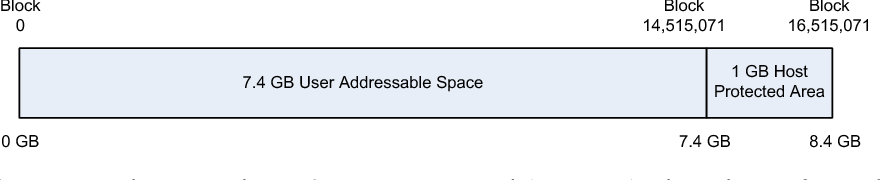
- Special area , generally unseen by common user. Can be configured by ATA.
- Invented with ATA-4.
- Computer vendor used to analysed it to detect whether disk is formatted by user or not
- READ_NATIVE_MAX_ADDRESS gives no all of available sectors.
- IDENTIFY_DEVICE gives no of accessible sectors
- the difference (if any) between commands mentioned in 4 ,5 is HPA, it was there but not seen by user
- To remove HPA SET_MAX_ADDRESS should be executed with proper value
- Using SET_MAX_ADDRESS < READ_NATIVE_MAX_ADDRESS will create HPA.
- Device Configuration Overlay
- Since ATA-6
- DCO can be used to hide the data
- As we discussed , IDENTIFY_DEVICE command returns information about the device, DCO can be used to make IDENTIFY_DEVICE show smaller size.
- DEVICE_CONFIGURATION_SET used to create DCO
- DEVICE_CONFIGURATION_RESET used to remove DCO
- Serial ATA
- Solution for traditional ATA
- Traditional ATA cables were so big and rigid. Selecting master-slave by jumper was critical.
- Serial ATA, Only 1 bit information is transferred at a time as compare to 16 bit information in original or parallel ATA
- Jumpers are not required anymore
- Controller can be placed between computer and disk so that computer will not know the type of hard drive type (SATA or PATA)
